pages

Thursday, September 30, 2010

vCO - mount NFS Datastore with VMware Orchestrator

Here a little action to mount a NFS export to a Host (assuming all export settings are checked for ESX).

Input parameter

  • Host [VcHostSystem] - Host to mount the NFS-Export
  • NfsServer [string] - IP or Name of Server exporting the NFS
  • NfsPath [string] - path to mount point from export, e.g. /mnt/export/NFS
  • DatastoreName [string] - Datastore name on Host 

Output parameter

  • Datastore [VcDatastore] - Datastore object of attached NFS-Store

Wednesday, September 29, 2010

vCO - setting DRS mode in VMware Orchestrator

To set DRS automation level is easy with vCO. But how to set the DRS mode (manual, partially automated and fully automated)?


The above example has Cluster [VcClusterComputeResource] and DRSmode [string] as input parameter. Output is Task as VcTask, so you can continue with action vim3WaitTaskEnd.

DRSmode has 3 possible values:

  • manual
  • partiallyAutomated
  • fullyAutomated

Sunday, September 26, 2010

vCO - functions in VMware Orchestrator

Sometimes you need a function to calculate a result and you don't want to use an action. Here we have an (sense free) example which shows us how a function is build up and used. Also the scope of used variables is demonstrated:


This example will log (in extra lines): 3, 4, 0, 7, 3, 4, 99

This show us the scope of defined variables. The variables a and b are defined in outer and inner (function) scope. The changed values (set to 99) will only affect the inner a and b. Otherwise c - there is no c defined inside the function or passed to it. So the outer c will be used.

After calling Add(a,b) the value of c is set to 99.

Regardless of the scope a function can return a value using the keyword return. There is no type definition. The function will return an object.

Warning - it is not recommended to manipulate outer variables from inside a function. It works, but making your code difficult to debug if any error or misbehavior occurs.

vCO - sorting arrays in VMware Orchestrator

The integrated sort function for array Array.sort() will sort the array ascending. This works good for scalar types like number. But how to sort descending (not using Array.reverse()) or sorting arrays containing complex types like virtual machines? Let's have a look.

The example above will log this:


The following example is sorting descending:


The example will log this:
The function "desc" returns a boolean to decide to sort or not. It works as comparator for the sorting algorithm inside sort(). I don't know this algorithm, but this is not necessary. Just use ist as sorting comparator. So if returned true the pairs will change place in array - like quicksort or so.

This offers us an option to sort non scalar types like virtual machine or other complex types.
Have a look at a workflow with VMs [Array/VirtualMachine] as input parameter - in this example my array contains 3 virtual machines:

The (partial) log shows this:


As you can see, the array is sorted ascending by the id of each VM. If you want the array sorted ascending by VM.name, try this (there are now 4 VMs in array):

And the log shows this:Be careful with your self created sort function. Use it only on homogen arrays. Because all elements must support the properties you use in your function. On heterogen arrays adapt your function to match all possible elements.

Tuesday, August 31, 2010

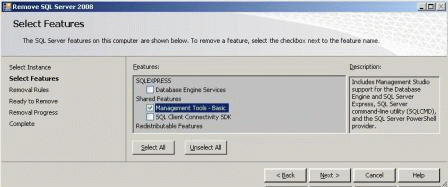
SQL 2008 Express Management

Somtimes the day begins as the last day ends... in this morning my fellow here at mightycare solutions tried to install the new vCenter Orchestrator for an enterprise customer. Because of the limited functionality (it is an proof-of-concept) he decides to use SQL 2008 Express with the SQL Express 2008 Management Studio. At frist we would install the SQL Server (like known from SQL deployments) and afterwards we decide to install the Management Studio.

After the installation of several features (.NET, .NET update, and so on) we install the SQL Server 2008 Express and start the installation of the Management Studio Express. But what is that? After choosing the "Add features to an existing instance..." we can not select the "Management Tools - Basic" option!


After a few moments of investigating we try to use the other, in my eyes senseless, option "Perform a new installation of SQL Server 2008" and what did my swollen eyes see? An option called "Management Tools - Basic"!

So i think this is another example of user experience at Microsoft...

Saturday, July 24, 2010

LabManager 4.0.2 - Bug or not? LabManager 4 reviewed

In the last months i have seen several LabManager 4 environments and some have a few problems. So i decided to post them, so that you know them before building a production environment.

Bug #1
The first thing i found is that ESXi as hypervisor is supported since Update 3.5 Update 5. The problem with ESXi is, that there is no SMB agent implemented, but LabManager support SMB import/export operations.


Bug #2
Second thing i have seen in several environments: ldap sync does not delete users when deleted in Active-Directory! In LabManager 4 you are able to set timings for ldap sync and also you can entitle AD-groups and users for workspaces and configurations. Now if you enable AD-groups and users a local user is created inside the LabManager. If you delete a user from the AD-group sometimes the ldap sync does not register this change. If you look inside the users of the LabManager the local copy of the deleted user is already there. I´ve tried to get the smallest sync time but nothing changes. Important to know is that you can´t find those useres in "stranded users". This is only for entitlements in which the workspace is deleted, so that the entitled users and their configurations could be assigned to the main workspace.

Bug #3
What if we want to backup the LabManager Configurations, Workspaces, VMs and so on? Only one hint by VMware: KB 1000023


But did i know anybody with more than one LabManager environment who use this scenario? No! The only thing you can do is to check out your VMs into the library with a defined version, export them via datastore (not SMB, bug #1) and import them as new template in the library...

I think that Bug #2 is security relevant, cause the user (already deleted in the AD) can further use the workspace, configuration or vm. Hope there will be some changes with version 4.1 or 4.5 :-)

Thursday, July 22, 2010

NEW - mcsWebServicePlugin - NEW

Have you ever ask yourself how to integrate own dynamic webservices into the vSphere Client? Not the poorly way with static .xml pages... now we develop a small freeware solution for this: the mcsWebServicePlugin!

With this vSphere Client Plugin you have the power to integrate your webservices based on the clicked object in the inventory tree. With this solution you are able to simply integrate your mangement boards based on the clicked ESX/ESXi Host-System:


But that´s not the only option. You can also integrate web-portals like your service desk, your monitoring solution or an order portal for new virtual machines. We use it for vCenter Orchestrator workflow integration.


The best is the really simple installation and configuration of the plugin. You have to copy the mcsWebServicePlugin.zip into plugins in your vSphere Client folder and extract it to a new folder in the plugins path. After starting the vSphere Client you can configure your webservice and copy the index.php and the info.php into this path.


At the moment this is the freeware version. In the future there will be a commercial release which would be much more dynamic and allows more than one tab and one central link location.

Feel free to ask for features or if you have any questions!

Here you can download the Plugin and the documentation:
mcsWebServicePlugin.zip
documentation_mightycare_webserviceplugin_v0.2.pdf