What I like when implementing these things is that the customer has the freedom to choose where to deploy. So there are no borders to deploy a VM or vApp in the vCloud Director for example. It´s just a decision field away :)
First thing you need is to have the Altiris SDK installed on your Altiris Deployment Server. You can find the actual version here: http://www.symantec.com/business/support/index?page=content&id=TECH40810
After the installation you will have another IIS website available: /Altiris.ASDK.DS/ which serves the webservice "API". Now we have two options: the SOAP plug-in and native HTTP POST/GET commands. I prefer the HTTP command way cause the SOAP API isn´t available as one WSDL definition.
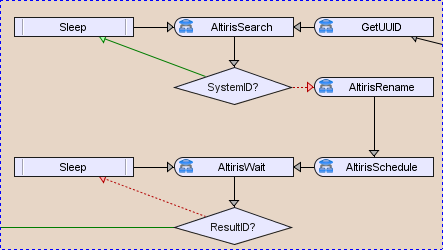
So the most simple way is to call the Altiris URL for the exact task. In my case I search for the UUID because the system is displayed as VMware-xxxxxxxxxxxxxxxx-xxxxxxxxxxxxxxx, rename the system into the VMname IN-parameter and schedule the exact job for the system. You can find the JobIDs via web-browser on the Altiris.ASDK.DS path.
The command for searching a system (HTTP GET) could look like this:
var url = "http://"+AltirisServer+"/Altiris.ASDK.DS/ComputerManagementService.asmx/GetComputerID?computerSearchPhrase=";url += Servernameurl += "&computerSearchType=2";var MyURL = new URL(url);MyURL.getContent();var Result = MyURL.result;So, now have fun to automate your Altiris Deployment :)
Maybe this also could be used to automate the vApp deployment including Altiris for the vCloud Director...

